Where an Oopbuy order meets an exchange rate, step by step
Five places where money crosses a currency line on one order, in the order you reach them, each with the official wording and what it leaves unsaid.
- Top-up. Your money enters the account.
- First payment. Products and the seller's freight to the warehouse.
- Supplements. Price changes and extra domestic freight.
- Second payment. International shipping after weighing.
- Money coming back. Refunds, withdrawals, coupons and points.
Topping up with PayPal or a card
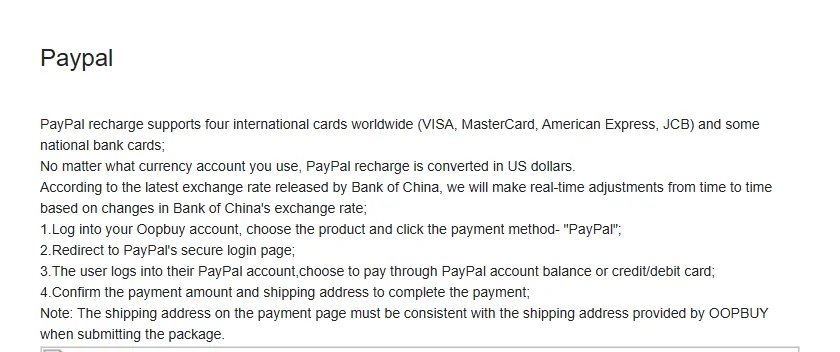
Oopbuy's Top up page lists PayPal with four international card brands, VISA, Mastercard, American Express and JCB, plus some national bank cards. Two sentences on that page matter for this site. First: no matter what currency account you use, a PayPal top-up is converted in US dollars. Second: the rate follows the latest Bank of China rate and is adjusted from time to time.
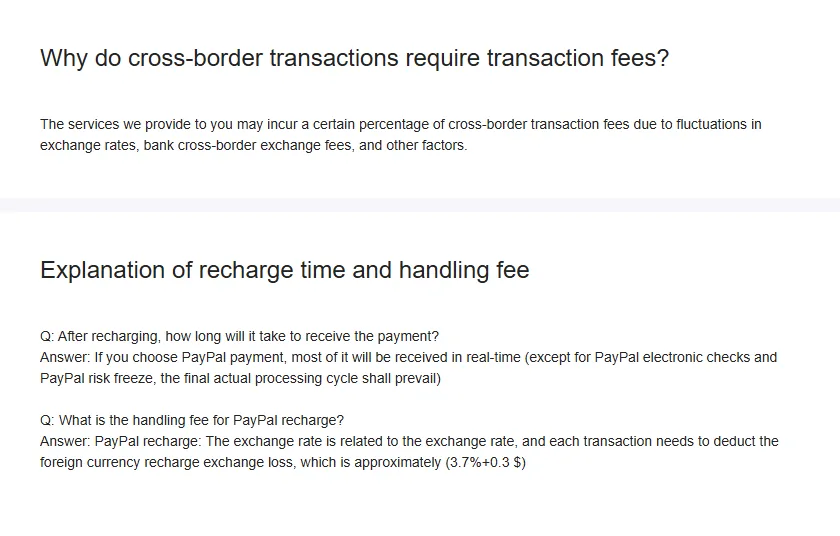
The page puts the PayPal fee at 4.5% + $0.30. An older FAQ on recharge time gives 'approximately 3.7% + $0.30' and describes it as the foreign currency exchange loss. Two official figures, one fee; we print both and use the higher one in our examples, because it is on the page you top up from.
If your PayPal or card is in euros or pounds, that means two conversions before a single yuan is spent: your currency to dollars on the PayPal side, then dollars to the agent's balance. Each step can carry its own spread. Paying from a dollar balance, where you have one, removes the first.
Topping up with Wise or a bank transfer
Wise top-ups accept five currencies: USD, GBP, EUR, NZD and AUD. Each currency has its own recipient details, so the page warns you to check them before sending. Sending in your own currency avoids a forced detour through dollars.
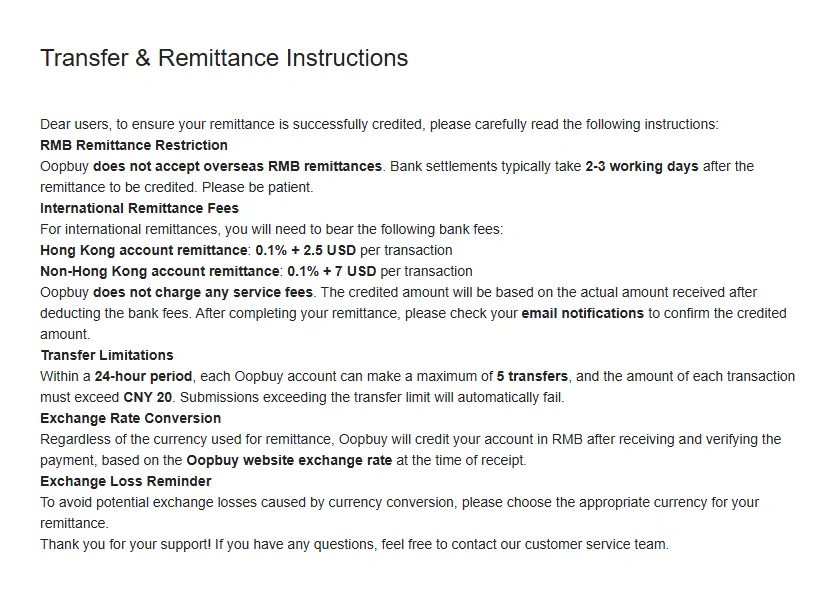
Bank transfers follow a separate article, Transfer and Remittance Instructions. Overseas yuan remittances are not accepted. Bank fees are on you: 0.1% + US$2.5 per transfer from a Hong Kong account, 0.1% + US$7 from anywhere else. Each transfer must exceed 20 yuan and you can send at most five in 24 hours. Settlement takes two to three working days.
Then the sentence this site exists for: whatever the currency, Oopbuy credits your account in yuan at the 'Oopbuy website exchange rate' at the time of receipt. That is the printed rate, applied to your money on arrival. The article closes by suggesting you pick your remittance currency carefully to avoid exchange losses.
The first payment: products and domestic freight
When you submit an order, you pay for the item and for the seller's freight to the warehouse in Xiamen. Both are yuan amounts set by the seller. Your screen shows them in your display currency at the printed rate.
We have not logged in to watch a balance being charged, so we will not claim to know the exact rate used at that moment. The official pages point one way: transfers are credited in yuan at the website rate, and prices are displayed at the same fixed rate we read in the estimator. If you have an account, the check is easy: note your balance before and after an order and divide by the yuan total.
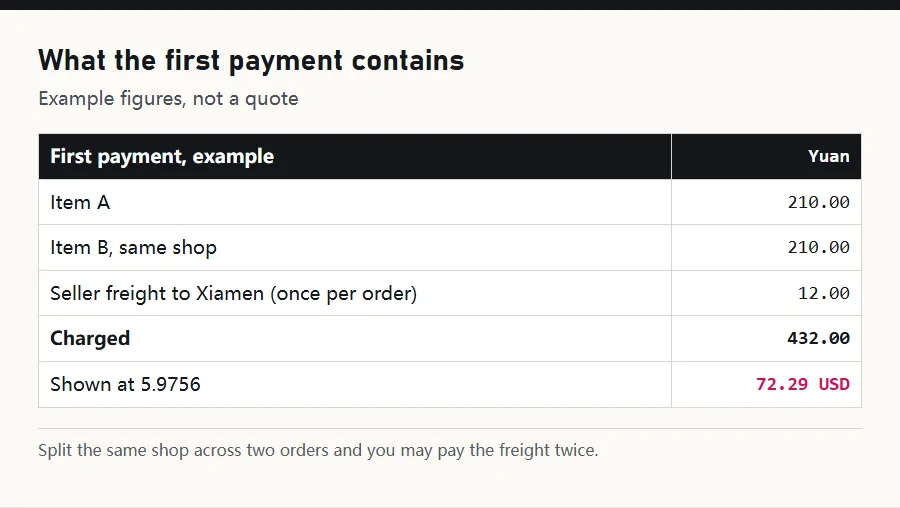
A small trap here: one shop, several items. Sellers often charge one freight fee per order, so splitting items from the same shop across orders can cost more freight, all of it converted at the same rate.
Supplements: when you are asked to pay again
Two official articles explain extra payments. The first covers orders already paid where a balance is still due: the seller changed the price, or domestic delivery cost more than expected. You verify and pay the difference.
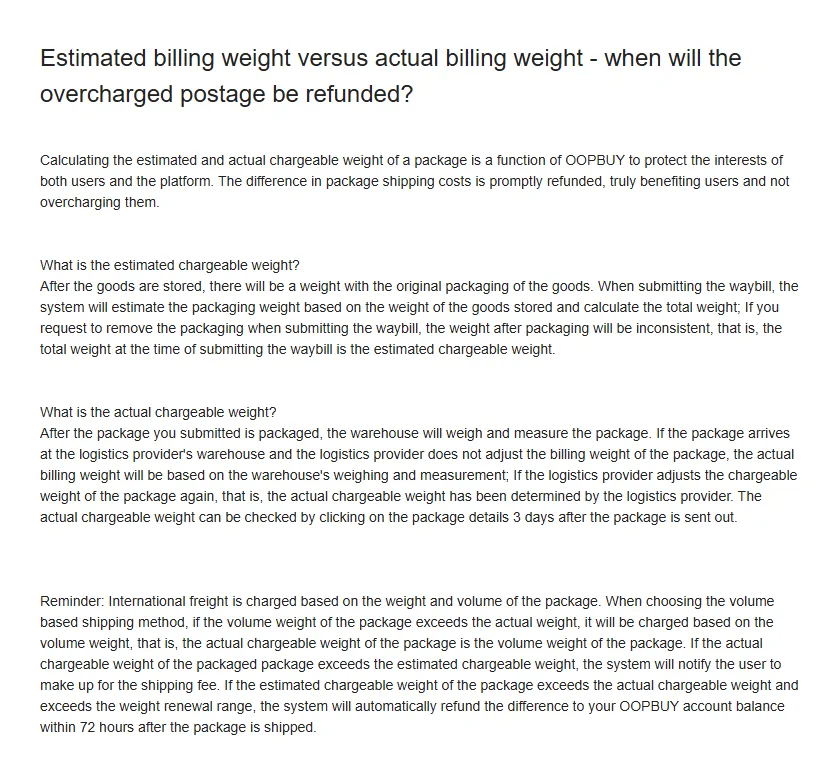
The second covers shipping. When you submit a parcel, the system estimates its weight; after packing, the warehouse weighs and measures it, and the carrier may adjust again. If the actual chargeable weight exceeds the estimate, you are asked to make up the difference. If it comes in lower, the overcharge is refunded.
Each supplement is a fresh yuan amount converted at the same printed rate. None of them carries a separate fee that we could find, but each one is a moment to re-read the figure on screen, because the same rule applies.
The second payment: international shipping
Shipping is quoted in yuan and converted at the printed rate. This is the payment the estimator previews, which is why it is the easiest place to read the rate: you see both currencies for every line before you have spent anything.
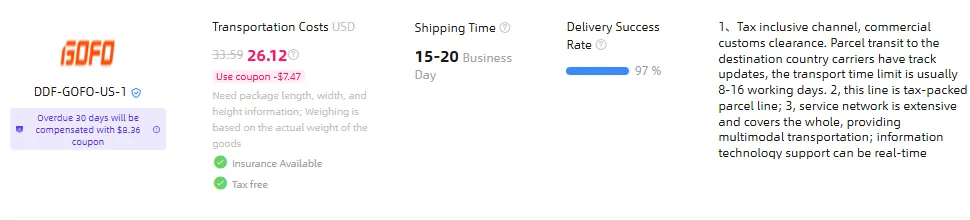
The estimator also shows coupons in both currencies. On 15 October 2026 the GOFO line read 156.08 yuan after a coupon of 44.64 yuan, and 26.12 dollars after a coupon of 7.47 dollars. Compensation promises are converted too: the same card offers a 50 yuan coupon if delivery runs 30 days late, shown as 8.36 dollars, 7.45 euros or 6.31 pounds.
A coupon does not change the rate. It reduces the yuan amount, and what is left is converted the same way.
Money coming back: refunds, withdrawals and coupons
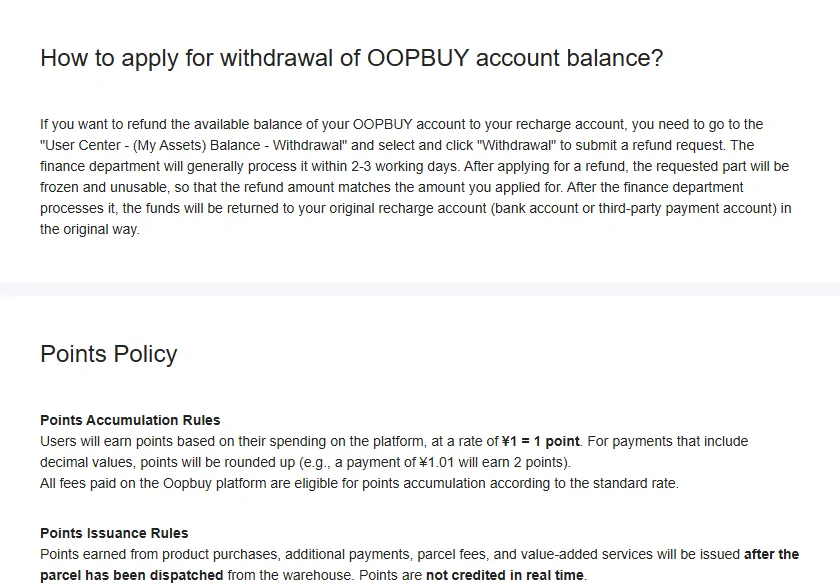
If an order is cancelled before purchase, or a seller or customs refuses it, the product payment returns to your Oopbuy balance. To move money out of the balance you request a withdrawal; it is processed as a refund to the original payment account. The official timing table says two to three working days to a PayPal balance and three to ten to a card.
What no page says is the rate used on the way back. Money that came in at the printed rate could, in principle, go out at the same rate, at a market rate, or at the original transaction's rate. We do not know, so we will not guess. If you have done a withdrawal, the arithmetic would settle it.
Coupons and points live in yuan. The new-user bundle is a yuan amount, the points policy gives one point per yuan (rounded up, so 1.01 yuan earns two), and points are issued after the parcel leaves the warehouse. Their value in your currency follows the same printed rate.
The cross-border fee nobody quantifies
One short FAQ answers why cross-border transactions carry fees: the services 'may incur a certain percentage of cross-border transaction fees due to fluctuations in exchange rates, bank cross-border exchange fees, and other factors.' No percentage is given.
Read it beside the rest and it fits: the conversion spread is the main place where those costs are recovered. We are not aware of a separate line item called a cross-border fee on an order, and the Service and Fees page lists none. If you see one, the date and a screenshot would help everyone.
Practical upshot: count the PayPal fee, count the conversion, and do not expect a third surprise from this FAQ.